Updated November 3, 2026. Per-GPU hourly price examples were removed, and the article was rewritten to compare rental types and billing structure based on official docs checked on November 3, 2026. Rates change by GPU, region, and time, so check the official pricing pages linked below.
An hourly rate alone does not compare the two
The first number you see when choosing a GPU cloud is the GPU hourly rate. The actual bill adds several more items: whether the job can be stopped midway, the hours re-run after a stop, disk charges that remain after the job ends, and transfer charges for downloading results.
RunPod and Vast.ai have different rules for these items. RunPod separates its own operated tier (Secure Cloud) from a provider network (Community Cloud); Vast.ai is a marketplace where hosts set prices. The sections below follow what each service’s official docs state.
RunPod: separate the cloud tier from interruptibility
RunPod Pods come in two tiers. Secure Cloud runs in T3/T4 data centers, and the docs recommend it for production and sensitive data. Community Cloud connects individual providers peer to peer, with variable reliability and generally lower prices. According to the docs, Community Cloud Pods are not guaranteed a public IP, so the SSH port may not be reachable from outside, and network volumes are available only in Secure Cloud. RunPod states that it is no longer accepting new Community Cloud hosts; existing resources remain available.
Interruption is a separate setting. The API docs describe an interruptible Pod as one that can be rented at a lower cost but can be stopped at any time to free resources for another Pod. An on-demand Pod cannot be displaced by other users, and deploying one requires at least one hour’s worth of credits for the configuration.
Billing rules:
- Compute and disks are billed per second; network volumes are billed hourly.
- There are no data ingress or egress fees.
- The container disk is erased and stops billing when the Pod stops. The volume disk remains until the Pod is deleted, and its rate while stopped is higher than while running.
- Pods stop automatically when the balance reaches zero. A Pod without a network volume is terminated and its data cannot be recovered.
- Savings plans are no longer sold (existing plans stay active until they expire).
Vast.ai: a host marketplace with three rental types
Vast.ai is a marketplace where hosts list machines and prices. There are three rental types:
- On-demand: fixed host pricing, guaranteed resources for the rental period, high priority. The maximum rental duration is shown on the offer card.
- Reserved: on-demand with a prepaid commitment discount, which the docs put at up to 50%. You convert an existing on-demand instance.
- Interruptible: the lowest-cost type, using bids. A higher bid or an on-demand request pauses the instance. Data is kept while paused, but the instance cannot be used, and it resumes automatically when it regains priority.
The type cannot be changed after renting, except for converting on-demand to reserved.
Billing differs from RunPod in several places:
- Compute is billed per second of actual use.
- Storage is billed while the instance exists, whether running or stopped, and the docs say storage for stopped instances typically costs more. Deleting the instance stops the charge.
- Upload and download bandwidth is billed per byte, at rates set by the host. For data-heavy work this item can change the total considerably.
- Credits must be added before starting an instance. When the balance reaches zero, instances stop, and without a saved payment method, instances and data are scheduled for deletion.
- The docs note that hosts with higher reliability scores tend to charge more, and advise checking a host’s reliability score before long jobs.
Compute the total from interruption, storage, and transfer
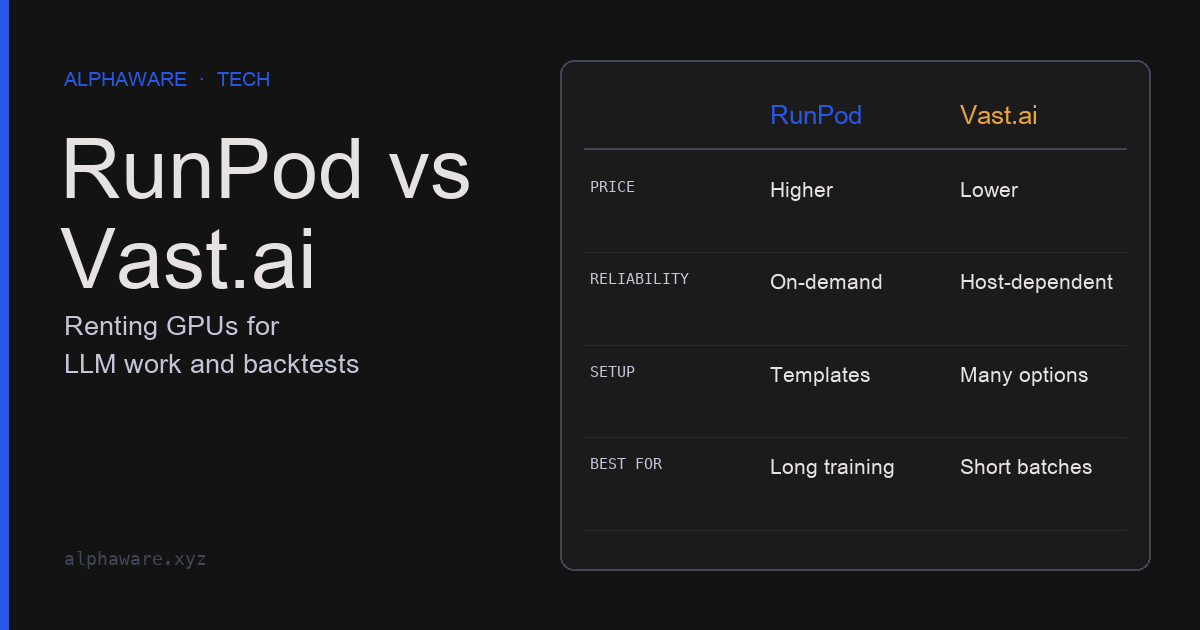
Item by item, the two services differ as follows.
| Item | RunPod | Vast.ai |
|---|---|---|
| Who sets the price | RunPod publishes by GPU and tier | Per-host offers |
| Low-cost interruptible type | Interruptible Pod (can be stopped at any time) | Interruptible (bids; paused, then resumed) |
| Commitment discount | Savings plans no longer sold | Reserved (up to 50%, prepaid) |
| Compute billing unit | Second | Second |
| Disk while stopped | Volume disk billed at a higher rate than running | Billed until the instance is deleted, typically higher |
| Data transfer | No ingress or egress fees | Upload and download billed per byte, host-set rate |
| Start condition | On-demand needs at least one hour of credits | Credits added before start |
Based on both services’ official docs, checked November 3, 2026. Rates are left out of the table.
To compare the cost of the same job, put these items into one formula. All rates in the code below are fictional; it only shows how a lower hourly rate can lose on the total because of transfer charges and re-runs.
# All rates are fictional values that show the structure. Check real rates on each service's pricing page.
def job_cost(gpu_per_hr, run_hours, disk_gb, disk_per_gb_month, idle_hours=0.0,
             idle_disk_per_gb_month=None, egress_gb=0.0, egress_per_gb=0.0,
             rerun_fraction=0.0):
    hours_per_month = 730
    idle_rate = disk_per_gb_month if idle_disk_per_gb_month is None else idle_disk_per_gb_month
    compute = gpu_per_hr * run_hours * (1 + rerun_fraction)   # includes hours re-run after interruptions
    storage = disk_gb * (disk_per_gb_month * run_hours + idle_rate * idle_hours) / hours_per_month
    transfer = egress_gb * egress_per_gb
    return round(compute + storage + transfer, 2)

# Fictional scenario: the same 10-hour job. B pays transfer on 200GB of results and re-runs 30% after interruptions.
# In both cases the disk is kept for a week (168 hours) after the job.
offer_a = job_cost(gpu_per_hr=1.00, run_hours=10, disk_gb=200, disk_per_gb_month=0.10,
                   idle_hours=168, idle_disk_per_gb_month=0.20)
offer_b = job_cost(gpu_per_hr=0.60, run_hours=10, disk_gb=200, disk_per_gb_month=0.10,
                   idle_hours=168, idle_disk_per_gb_month=0.20,
                   egress_gb=200, egress_per_gb=0.02, rerun_fraction=0.3)

assert offer_a == 19.48
assert offer_b == 21.28                      # 40% cheaper per hour, more expensive in total
assert job_cost(0.60, 10, 200, 0.10, 168, 0.20) == 15.48   # cheaper without transfer and re-runs
For a real comparison, use the same GPU model and memory and the same job hours, and take rates from each service’s pricing page. Do not guess the re-run fraction; estimate it from stop and restart records in short trial jobs.
Selection criteria by workload
Short experiments and prototyping
For jobs of a few hours, the cost of an interruption is small. Interruptible types or low-cost offers do not add much re-run burden. If you download the dataset every time, check the host’s bandwidth rate on Vast.ai, and the lack of a guaranteed public IP on RunPod Community Cloud.
Long training and fine-tuning
A stop turns all the hours since the last checkpoint into re-run cost. Start from types that are not interrupted (RunPod on-demand, Vast.ai on-demand or reserved), and on Vast.ai on-demand, check that the maximum rental duration on the offer card exceeds the job length. To use a low-cost type, shorten the checkpoint interval and store checkpoints outside the instance.
Parallel batch backtests and parameter searches
If the work splits into independent pieces, only the interrupted pieces need to run again, which is where the low rate of interruptible types matters. The prerequisites are that each piece produces the same result from the same input and writes its result to external storage as soon as it finishes. A wider search also raises overfitting risk, so apply the checks in Preventing overfitting.
Always-on inference services
Per-second billing accumulates for every hour the service is on. If it must run 24 hours a day, compare commitment discounts, serverless-style billing, dedicated servers, and your own hardware on the same monthly hours. Criteria for your own hardware are in the quant hardware column.
Design jobs on the assumption they will be interrupted
On either service, do not keep results only on the instance disk. RunPod’s container disk is erased when the Pod stops, and a Pod without a network volume loses its data for good when the balance reaches zero. RunPod’s docs also say the platform is not designed for long-term storage and advise backing up important data elsewhere. Vast.ai keeps data while an instance is paused, but its docs recommend saving often, keeping important outputs in cloud storage, and using checkpoints.
The minimum design conditions are three: write checkpoints and results outside the instance, have a restarted job resume from the last checkpoint, and get the same result when re-running the same input. With these in place, more jobs can use low-cost types. When a job ends, clean up instances and leftover volumes to avoid idle storage charges.
Sign up with RunPod referral link to get a first-credits bonus. Also check Vast.ai for price comparisons.
Sources and scope
- RunPod pricing page: current rates by GPU and tier (not copied into this article).
- RunPod Pod pricing docs: per-second billing, no transfer fees, billing by disk type, zero-balance handling, savings plans discontinued.
- RunPod guide to choosing a Pod: Secure versus Community Cloud, no new Community hosts.
- RunPod create-Pod API: when interruptible Pods can be stopped, default cloud type.
- Vast.ai pricing docs: per-second billing, storage and bandwidth charges, credits and zero-balance handling, reliability score and price.
- Vast.ai instance types: priority of on-demand, reserved, and interruptible, and data while paused.
- This article did not measure either service’s performance, availability, or interruption frequency, and does not claim that either is always cheaper.